
AMD ROCm Tutorial
This is an end-to-end tutorial for running SpecForge on AMD Instinct GPUs (ROCm). It walks through installation → data preparation → offline colocated training → online disaggregated training. Within the online workflow, it covers external services under one supervisor, the managed-local shortcut, and external producer/consumer roles split across process pools or nodes.
All commands assume a ROCm host with the AMD driver stack and Docker already installed. Validated on MI300X (gfx942) and MI355X (gfx950).
1. Installation
On ROCm, install SpecForge into an environment that already provides a ROCm PyTorch and a ROCm SGLang, and install the package without dependencies so pip does not pull CUDA wheels over the working ROCm stack.
The recommended base is an official SGLang ROCm release container. These ship a ROCm PyTorch and an editable ROCm SGLang build, so SpecForge only needs to be cloned and installed on top.
Step 1: Pull the image for your accelerator
The accelerator is baked into the tag, so use the image that matches your hardware:
# AMD Instinct MI300X (gfx942)
docker pull lmsysorg/sglang:v0.5.18-rocm720-mi30x

# AMD Instinct MI355X (gfx950)
docker pull lmsysorg/sglang:v0.5.18-rocm720-mi35x
Step 2: Start the container
Expose the ROCm device nodes (swap in the tag for your accelerator). Use --name and omit --rm so the checkout survives across sessions:
docker run -it --name specforge \
  --device=/dev/kfd --device=/dev/dri \
  --group-add video --cap-add SYS_PTRACE --security-opt seccomp=unconfined \
  --ipc=host --shm-size=16g \
  lmsysorg/sglang:v0.5.18-rocm720-mi30x \
  bash
--device=/dev/kfd --device=/dev/dri --group-add video are required for ROCm GPU access; --ipc=host --shm-size=16g gives Mooncake and PyTorch enough shared memory. Re-enter the running container later with docker exec -it specforge bash.
Step 3: Clone and install SpecForge
Inside the container, clone SpecForge into /workspace/SpecForge and register it in editable mode without touching the image's torch/sglang:
git clone https://github.com/sgl-project/SpecForge.git /workspace/SpecForge
cd /workspace/SpecForge
python -m pip install -e . --no-deps
--no-deps is mandatory: a full resolve pulls the CUDA SGLang stack and clobbers the image's ROCm torch/sglang. If a later step reports a missing lightweight dependency (for example accelerate), install just that package, also with --no-deps.
DFlash drafts use the Liger RMSNorm/SwiGLU kernels by default on ROCm (model.use_liger_kernel), and training stops with an install hint when Liger cannot be imported. Install it without dependencies so pip keeps the image's ROCm Triton instead of pulling the CUDA triton wheel:
python -m pip install --no-deps "liger-kernel>=0.8.3,<0.9"Set model.use_liger_kernel: false to train with the native Qwen3 modules instead.
The images ship neither wandb nor TensorBoard:
python -m pip install wandb
python -m pip install --no-deps tensorboard tensorboard-data-server absl-py markdown werkzeug
Step 4: Apply the capture patch (online runs only)
These images pin SGLang to exactly 0.5.18 (editable at /sgl-workspace/sglang), so the online capture patch applies unchanged. Skip this step for offline training, which reads features from disk and needs no capture service:
cd /workspace/SpecForge
scripts/apply_sglang_spec_capture_patch.sh --target v0.5.18
The patch adds the --enable-spec-capture, --spec-capture-method, and --spec-capture-aux-layer-ids server flags plus the sglang.srt.spec_capture_sink module used by online capture.
Step 5: Attention backends on ROCm
Use the sdpa or flex_attention attention backends for the trainer on ROCm. The fa (flash-attn) and usp backends, and yunchang-based Ulysses/Ring sequence parallel (sp_ulysses_size / sp_ring_size > 1), depend on a CUDA flash-attn build; the single-GPU / data-parallel path never loads yunchang, and selecting those backends raises a clear error. The checked-in qwen3.5-4b-dflash-amd.yaml recipe already uses flex_attention, so it runs on ROCm unchanged as a single-GPU offline DFlash example.
The capture side (the SGLang target that materializes hidden states, both offline and online) has an extra ROCm requirement for Qwen3.5-4B, a hybrid linear-attention/Mamba target: run it under AITER and disable the radix cache. Section 3 covers this in detail.
2. Data preparation
Data preparation is platform independent — the same scripts run on ROCm. Write a ShareGPT training set into cache/dataset from the repository root:
python scripts/prepare_data.py --dataset sharegptThis produces ./cache/dataset/sharegpt_train.jsonl in the stable id + conversations contract used by every checked-in recipe. For the full preset list, custom datasets, preformatted text, and target-model regeneration, see the Data Preparation guide.
3. Offline colocated training
Offline training reads target features from disk, so the trainer only has to fit the draft model. It uses more storage but keeps target inference out of the training loop, and needs no capture patch or Mooncake. This section trains a Qwen3.5-4B DFlash draft (configs/qwen3.5-4b-dflash.json).
Step 1: Capture hidden states
Feature preparation is a data-processing step, not a second training entry point. Qwen3.5-4B is a hybrid linear-attention/Mamba target, so run the capture under AITER and pass --sglang-disable-radix-cache. Without it, SGLang's Mamba radix cache selects the extra_buffer strategy, which asserts CUDA/MUSA/NPU (FLA) at server init and fails on ROCm:
SGLANG_USE_AITER=1 SGLANG_USE_AITER_UNIFIED_ATTN=1 AITER_FLYDSL_FORCE=1 \
torchrun --standalone --nproc_per_node 1 \
  scripts/prepare_hidden_states.py \
  --target-model-path Qwen/Qwen3.5-4B \
  --strategy dflash \
  --draft-model-config configs/qwen3.5-4b-dflash.json \
  --trust-remote-code \
  --data-path ./cache/dataset/sharegpt_train.jsonl \
  --output-path ./cache/hidden_states/qwen3.5-4b-dflash-sharegpt \
  --chat-template qwen3.5 \
  --max-length 2048 \
  --tp-size 1 \
  --batch-size 8 \
  --sglang-attention-backend aiter \
  --sglang-disable-radix-cache \
  --sglang-mem-fraction-static 0.8 \
  --sglang-context-length 2560
The output path matches data.hidden_states_path in the checked-in offline recipe. See Data Preparation for preformatted inputs and other options.
Data note:
prepare_hidden_states.pytruncates each rendered conversation atmax_length. A long prompt can push the assistant reply past the cutoff, leaving an empty loss region (fewer than two anchorable tokens), which trips DFlash's anchor sampler (ValueError: should preprocess the data.). Drop the captured samples with< 2loss-mask tokens before the lastblock_sizepositions before training. The online path (Section 4) never hits this — its producer regenerates full-length responses.
Step 2: Train
The checked-in offline recipe already uses flex_attention for the trainer, so it runs on ROCm unchanged:
specforge train --config examples/configs/offline/colocated/qwen3.5-4b-dflash-amd.yamlOverride any field inline without copying the YAML, e.g. a quick smoke run:
specforge train --config examples/configs/offline/colocated/qwen3.5-4b-dflash-amd.yaml \
  training.max_steps=20 output_dir=./outputs/dflash-offline-smoke
See the Training guide for the full run schema, checkpoint/resume rules, and evaluation.
Optional: Offline disaggregated deployment
The walkthrough above is offline colocated: the trainer reads prepared feature files directly. If a producer must ingest those files for a separate trainer pool, choose a recipe under examples/configs/offline/disaggregated/. The feature source remains offline; only the deployment topology changes. This path does not start SGLang. A shared_dir backend requires storage visible to the producer and consumers, while a Mooncake backend requires an existing Mooncake deployment. See Offline shared-directory and Mooncake stores for the complete contract.
4. Online disaggregated training
Online training captures target features live from a patched SGLang server and streams them through Mooncake to the trainer. Every online run is disaggregated: a producer drives prompts through the capture server and a consumer trains the draft model. The choices below change service ownership and process placement; they do not create additional training modes.
External services with a single-node supervisor
With deployment.trainer.nnodes: 1 and no --role, one specforge train command supervises the producer and consumer. Mooncake and SGLang remain external services started by the user.
This section uses the external qwen3.5-4b-dflash-amd.yaml recipe as a single-node smoke test. external means that the user starts Mooncake and SGLang; the services still run locally in this example. Complete Step 4 of the installation first.
Step 1: One-time run inputs
DFlash needs no shared vocabulary mapping (that is an EAGLE3-only requirement, where a reduced draft vocabulary must be derived once and shared by producer and consumer). DFlash keeps the full vocabulary and derives its target signal from the draft's target_layer_ids, so there is nothing to precompute.
Qwen3.5-4B is also a large sharded checkpoint that already ships a *.index.json weight map and a resolvable head, so it needs no local target directory or index workaround. Just make sure cache/dataset/sharegpt_train.jsonl exists (Section 2).
Step 2: Start Mooncake and the capture server
Start the Mooncake master. Set --default_kv_lease_ttl=500: the consumer's teardown drain now allows about 19.5s for leases to settle, while the shorter managed TTL keeps a normal shutdown from waiting several seconds for an expired read lease.
mooncake_master --enable_http_metadata_server=true \
  --rpc_port=35551 --http_metadata_server_port=35880 \
  --metrics_port=35903 --enable_metric_reporting=false \
  --default_kv_lease_ttl=500 &
Start the patched capture server on GPU 0. The --spec-capture-aux-layer-ids must match the draft's target_layer_ids — for DFlash these are read straight from configs/qwen3.5-4b-dflash.json: 1 8 15 22 29 (this is not the EAGLE3 [1, num_layers//2 - 1, num_layers - 4] formula). A mismatch produces zero features with no error. Because Qwen3.5-4B is a hybrid Mamba target, the server must run under AITER with --attention-backend aiter and --disable-radix-cache (see Section 3 for why):
SGLANG_USE_AITER=1 SGLANG_USE_AITER_UNIFIED_ATTN=1 AITER_FLYDSL_FORCE=1 \
HIP_VISIBLE_DEVICES=0 CUDA_VISIBLE_DEVICES=0 \
MOONCAKE_LOCAL_HOSTNAME=127.0.0.1 \
MOONCAKE_METADATA_SERVER=http://127.0.0.1:35880/metadata \
MOONCAKE_MASTER_SERVER_ADDR=127.0.0.1:35551 \
MOONCAKE_PROTOCOL=tcp \
MOONCAKE_GLOBAL_SEGMENT_SIZE=$((32<<30)) \
python -m sglang.launch_server \
  --model-path Qwen/Qwen3.5-4B \
  --trust-remote-code \
  --skip-tokenizer-init \
  --tp-size 1 \
  --context-length 4096 \
  --mem-fraction-static 0.8 \
  --attention-backend aiter \
  --chunked-prefill-size -1 \
  --disable-radix-cache \
  --enable-spec-capture --spec-capture-method dflash \
  --spec-capture-aux-layer-ids 1 8 15 22 29 \
  --host 127.0.0.1 --port 30000 &
Wait for curl --fail http://127.0.0.1:30000/health to return 200 (the first health check can take a few minutes while AITER kernels compile). --context-length must exceed data.max_length (2048) or /generate returns 400 input longer than context length.
Step 3: Launch training
One command supervises producer and consumer on GPU 1:
CUDA_VISIBLE_DEVICES=1 HIP_VISIBLE_DEVICES=1 \
MOONCAKE_LOCAL_HOSTNAME=127.0.0.1 \
MOONCAKE_METADATA_SERVER=http://127.0.0.1:35880/metadata \
MOONCAKE_MASTER_SERVER_ADDR=127.0.0.1:35551 \
MOONCAKE_PROTOCOL=tcp \
MOONCAKE_GLOBAL_SEGMENT_SIZE=$((32<<30)) \
specforge train -c examples/configs/online/disaggregated/external/qwen3.5-4b-dflash-amd.yaml \
  training.max_steps=20 training.num_epochs=1 \
  training.save_interval=20 training.log_interval=5
The trainer needs no AITER env — it runs flex_attention on ROCm; only the capture server (Step 2) drives the Mamba target. Before rerunning, clear stale control state: rm -rf outputs/qwen3.5-4b-dflash-online.
Success criteria
- Producer log:
drive_producer returning produced=<N> prompts_failed=0. - Consumer log:
step N: {...loss..., acc...}lines, and nocould not drainerror or traceback at teardown. - Checkpoint:
outputs/qwen3.5-4b-dflash-online/qwen3.5-4b-dflash-online-step20/containstraining_state.ptandtraining_state_rank0.pt.
If
produced=0, the capture aux-layer ids do not match the producer contract (see Step 2). If training succeeds but teardown reportscould not drain, the Mooncake lease TTL is above the drain window (see Step 2).
Managed-local shortcut
Instead of starting Mooncake and the capture server by hand, a deployment.disaggregated.managed_local block lets one specforge train command own those local processes and derive their endpoints. It defaults default_kv_lease_ttl_ms to 500, so the lease-TTL fix is applied automatically. Managed-local owns one local process tree and cannot be launched with --role producer or --role consumer or split across nodes. See Multi-server capture for the managed-local profile.
Split an external run across process pools or nodes
This is the split-pool form of the external workflow above, not another training mode. Both roles must use the same resolved run contract, but each is launched explicitly:
# Inference / capture pool
specforge train -c examples/configs/online/disaggregated/external/qwen3.5-4b-dflash-amd.yaml --role producer

# Trainer pool
specforge train -c examples/configs/online/disaggregated/external/qwen3.5-4b-dflash-amd.yaml --role consumer
The checked-in AMD recipe is a single-node example and deliberately uses 127.0.0.1. For separate hosts, copy it to run.yaml and replace the loopback Mooncake and SGLang endpoints with addresses reachable by the relevant roles. Keep these values consistent across the deployment:
| Shared run contract | Node-local values |
|---|---|
run_id, data/training settings, store_id, capture contract, routable server_urls, and Mooncake metadata/master endpoints | MOONCAKE_LOCAL_HOSTNAME and GPU visibility |
control_dir, visible to the producer and consumers unless an inbox relay is configured | consumer_state_dir, on reliable local storage for consumer rank 0 |
output_dir, visible to every consumer rank, and the complete deployment.trainer topology | --node-rank on each consumer host |
For multiple consumer nodes, record deployment.trainer.nnodes, nproc_per_node, master_addr, and master_port once in the config, then pass only the node-local identity on each trainer host:
specforge train -c run.yaml --role consumer --node-rank 0   # trainer-0
specforge train -c run.yaml --role consumer --node-rank 1   # trainer-1
A fresh attempt requires fresh control and consumer-state directories, and every capture server must use the same target model, revision, capture method, and auxiliary layer ids — for this recipe --spec-capture-method dflash with aux ids 1 8 15 22 29, and on ROCm each must run under AITER with --disable-radix-cache (see External services, Step 2). For external-service prerequisites, freshness rules, multi-server capture, inbox relays, and resume, see the Disaggregated training guide.
For DeepSeek-V4-Flash DSpark on MI355X, follow the recipe runbook.
Reference results on MI355X
The offline and online paths were run end-to-end on a single AMD Instinct MI355X (gfx950) inside the lmsysorg/sglang:v0.5.14-rocm720-mi35x container, training a Qwen3.5-4B DFlash draft on ShareGPT. Qwen3.5-4B is a hybrid linear-attention/Mamba target (Qwen3_5ForConditionalGeneration); its draft is a 5-layer DFlash head (hidden_size=2560, block_size=16, target_layer_ids=[1, 8, 15, 22, 29]). Both runs used max_length=2048, chat_template=qwen3.5, batch_size=2, accumulation_steps=4, learning_rate=6e-4, num_anchors=512, loss_decay_gamma=7, a flex_attention trainer, and ~10 epochs (~680 optimizer steps).
The SGLang side (offline capture and online capture server) runs the hybrid Mamba target under AITER on ROCm — export SGLANG_USE_AITER=1 SGLANG_USE_AITER_UNIFIED_ATTN=1 AITER_FLYDSL_FORCE=1 and use --attention-backend aiter. A ROCm-specific requirement: the target needs the radix cache disabled (offline capture: --sglang-disable-radix-cache; external online server: --disable-radix-cache; managed-local config: model.sglang_disable_radix_cache: true). SGLang's Mamba radix cache auto-selects the extra_buffer strategy, which asserts CUDA/MUSA/NPU (FLA) at server init and fails on ROCm; disabling the radix cache bypasses that path. Offline consumes hidden states captured to disk by prepare_hidden_states.py; online consumes the same features streamed live from the AITER capture server through Mooncake. Both paths converge together — the online capture path reproduces offline quality on ROCm.
Training loss
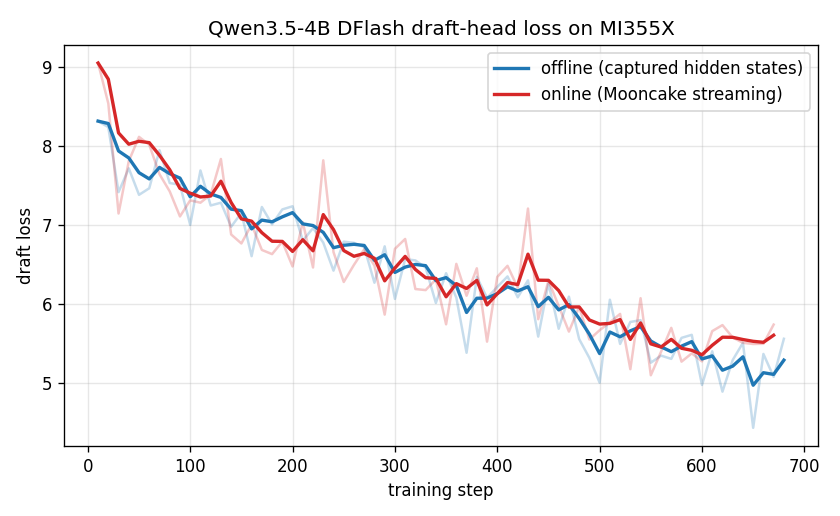
Draft loss falls from ~9 to ~5.6 over ~680 steps. Faint lines are raw per-step values; bold lines are an exponential moving average.
Draft accuracy
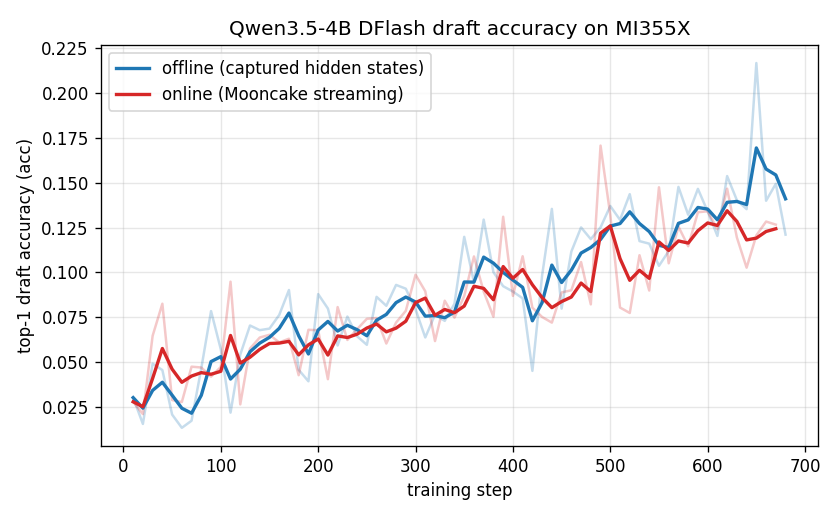
Top-1 draft-token accuracy (acc) — the training-time proxy for serving-time acceptance — rises from ~0.03 to ~0.12–0.13 and the two paths track each other closely.
Summary
| Metric (final) | Offline | Online |
|---|---|---|
| Draft loss (start → end) | 8.3 → 5.6 | 9.1 → 5.7 |
Top-1 draft accuracy (acc) | ~0.12 (peak ~0.22) | ~0.13 (peak ~0.17) |
| Epochs / steps | 10 / 687 | 10 / 670 |
Throughput (single MI355X, batch_size=2, max_length=2048):
- Offline capture: the AITER server generated hidden states for 572 prompts (286 batches) in ~48 s (~8 batches/s). The GPU-local trainer then ran at ~0.3 steps/s — sequences up to 2,048 tokens on a 4B target are much heavier than a small draft at short context.
- Online trainer: ~1.3 steps/s end-to-end (670 steps in ~520 s) with the capture server on GPU 0 and the trainer on GPU 1. A single AITER capture server produced 5,410 prompts across 10 epochs with 0 failures (~10 prompts/s); the single-command
managed_localstack (Mooncake master + capture server + trainer) came up and tore down cleanly (default_kv_lease_ttl_ms=500).
Data note (offline only):
prepare_hidden_states.pytruncates each rendered conversation atmax_length. Long-prompt samples whose assistant reply is pushed past the cutoff end up with an empty loss region, i.e. fewer than two anchorable tokens, which trips DFlash's anchor sampler (ValueError: should preprocess the data.). Drop those captured samples (any with< 2loss-mask tokens before the lastblock_sizepositions) before training. The online path never hits this — its producer regenerates full-length responses, so every streamed sample has a non-empty loss region.
These numbers are a functional reference for a 4B DFlash draft on ROCm, not a tuned performance benchmark — longer sequences and multi-GPU trainers scale differently.
Reference results on MI300X
The same Qwen3.5-4B DFlash recipe was reproduced end-to-end on a single AMD Instinct MI300X (gfx942) inside the lmsysorg/sglang:v0.5.14-rocm720-mi30x container, using identical hyperparameters (offline and online, max_length=2048, chat_template=qwen3.5, batch_size=2, accumulation_steps=4, learning_rate=6e-4, num_anchors=512, loss_decay_gamma=7, flex_attention trainer, ~10 epochs). The ROCm requirements are the same as on MI355X: run the hybrid Mamba target under AITER (SGLANG_USE_AITER=1 SGLANG_USE_AITER_UNIFIED_ATTN=1 AITER_FLYDSL_FORCE=1, --attention-backend aiter) and --disable-radix-cache to bypass the extra_buffer Mamba radix-cache FLA assertion.
Training loss
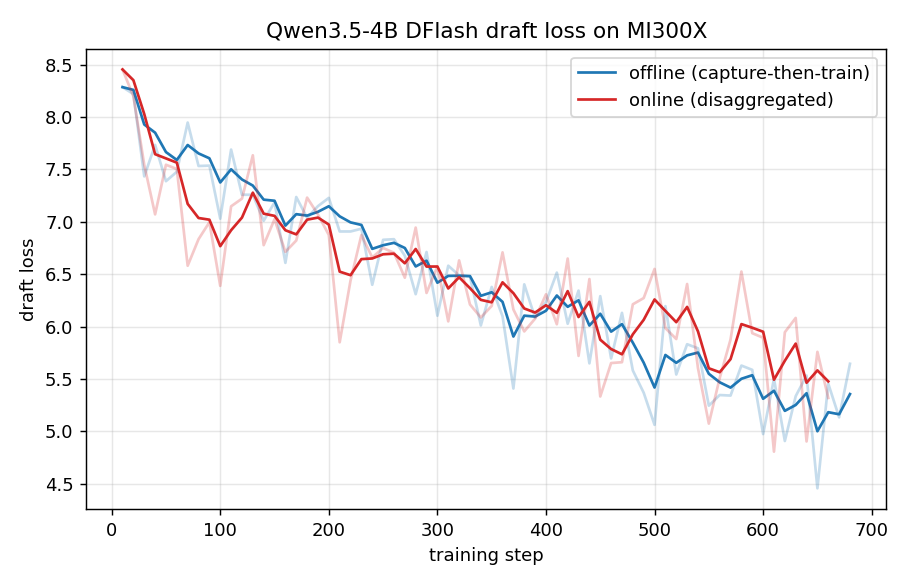
Draft loss falls from ~8.4 to ~5.4 over ~680 steps; faint lines are raw per-step values, bold lines an exponential moving average.
Draft accuracy
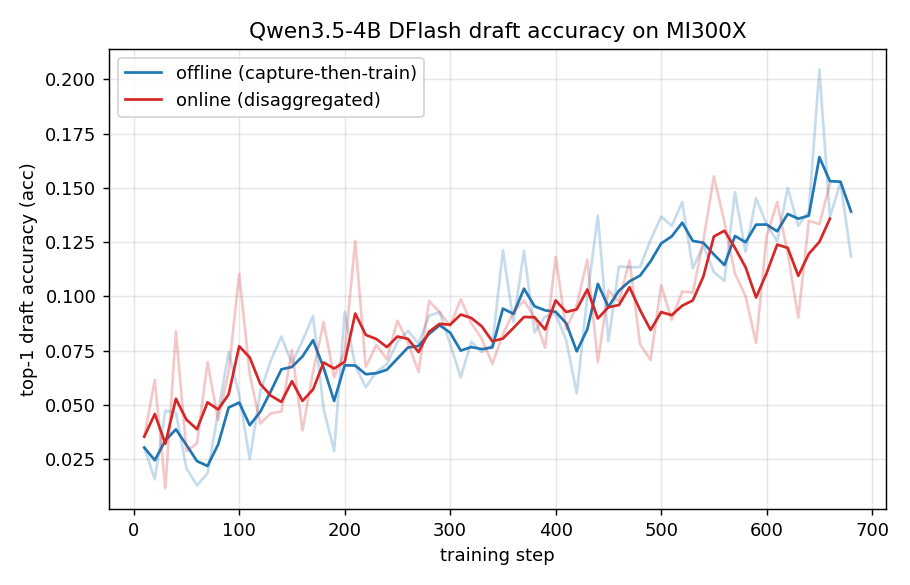
Top-1 draft-token accuracy (acc) climbs from ~0.02 to ~0.14, and the offline and online paths converge to the same quality — matching the MI355X result.
Summary
| Metric (final) | Offline | Online |
|---|---|---|
| Draft loss (start → end) | 8.3 → 5.4 | 8.5 → 5.5 |
Top-1 draft accuracy (acc) | ~0.14 (peak ~0.21) | ~0.14 (peak ~0.16) |
| Epochs / steps | 10 / 687 | 10 / 666 |
Throughput (single MI300X, batch_size=2, max_length=2048):
- Offline capture: the AITER server captured hidden states for all 572 prompts; 21 truncated samples with an empty loss region were dropped (see the data note below), leaving 551 for training.
- Online trainer: 666 steps in ~858 s (~0.78 steps/s) with the capture server on GPU 0 and the trainer on GPU 1. A single AITER capture server produced 5,330 prompts across 10 epochs with 0 failures (~6 prompts/s) and streamed 15,990 feature objects through Mooncake; the single-command
managed_localstack came up and tore down cleanly (default_kv_lease_ttl_ms=500).
Data note (offline only): identical to the MI355X run — the offline capture produced the same 21 empty-loss-region samples (mostly
max_length-truncated conversations), which must be dropped before training or DFlash's anchor sampler raisesValueError: should preprocess the data.. The online path never hits this.
Results on MI300X track MI355X closely, confirming the ROCm DFlash flow (AITER + --disable-radix-cache) is portable across gfx942 and gfx950.