LLaDA2.0-Uni#
LLaDA2.0-Uni accepts text and image input and supports text output, text-to-image generation, and image editing.
Highlights#
Unified dLLM-MoE Backbone — Built on LLaDA 2.0, unifying multimodal understanding and generation.
Top-Tier Understanding & Generation — Matches dedicated VLMs in visual QA and document understanding, while generating high-quality images.
Interleaved Generation & Reasoning — Empowered by unified discrete representations, unlocking interleaved generation and reasoning.
Architecture#
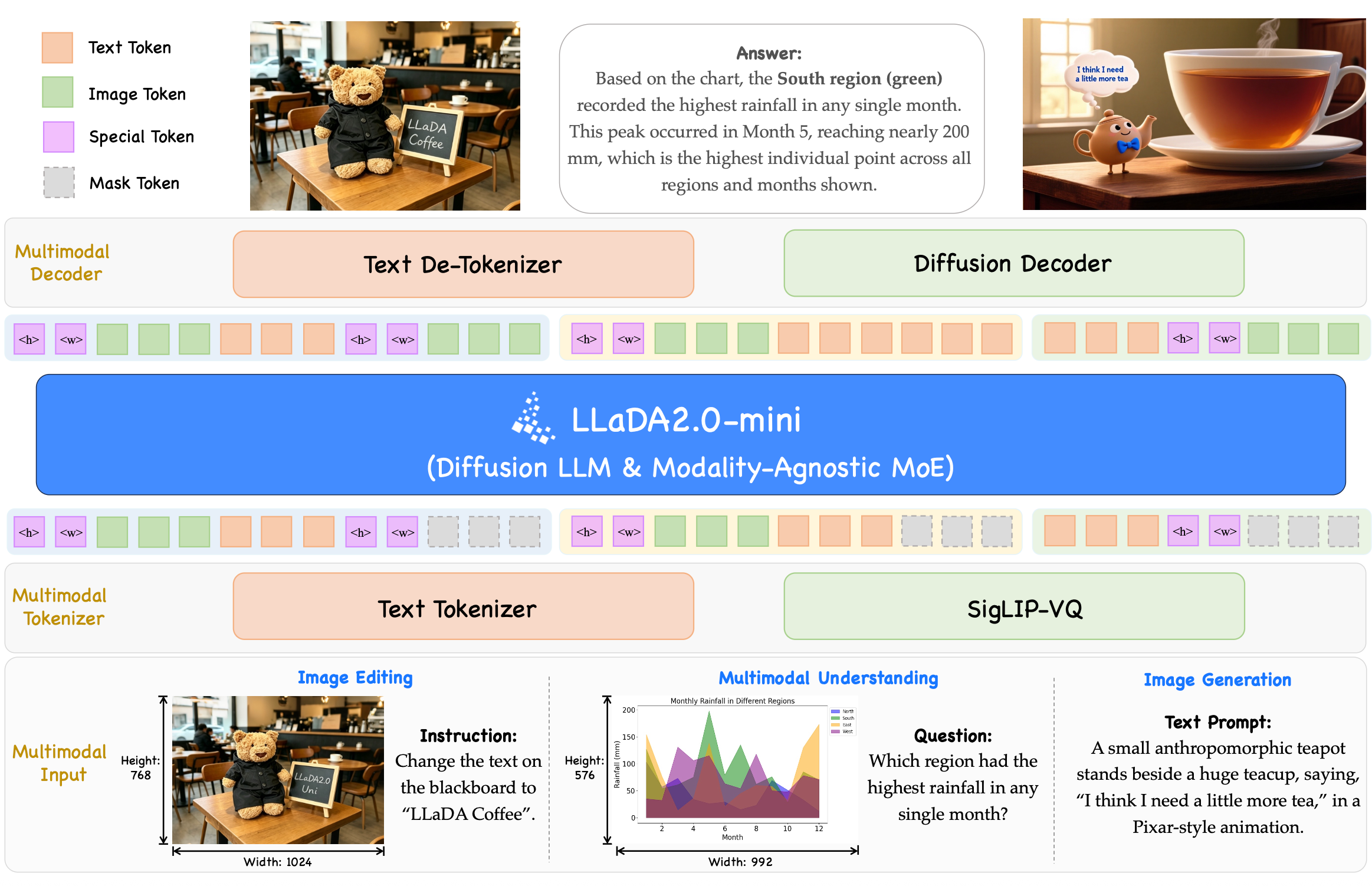
LLaDA2.0-Uni unifies multimodal understanding and generation into a simple Mask Token Prediction paradigm. Visual inputs are encoded by the SigLIP-VQ tokenizer into discrete semantic tokens, then mapped alongside text tokens to backbone hidden states under a unified mask prediction objective. Output tokens are decoded back to text via the Text De-Tokenizer, or reconstructed into high-fidelity images through the Diffusion Decoder. Empowered by unified discrete representations, it effortlessly handles complex interleaved generation and unlocks advanced interleaved reasoning, interleaving <|image|>…<|/image|> chunks to enable end-to-end training and inference within a single coherent framework.
Prerequisites#
Install sglang-omni by following Installation.
Server Configuration#
The default omni pipeline runs preprocessing, image encoding, and the
DLLM thinker, then routes to text and image decoders. The image decoder
uses diffusers’ ZImage backbone, SigVQ conditioning, and a VAE. This is
LLaDA2-Uni’s semantic decoder, not the LLaDA-Image text-conditioned model.
The text variant retains the four-stage text-output pipeline.
The CFG thinker currently uses synchronous eager execution. An explicit CUDA graph request is rejected until CFG graph metadata is supported.
sgl-omni serve --model-path inclusionAI/LLaDA2.0-Uni --port 8000 \
  --thinker.engine.enable_torch_compile false
The cookbook explicitly disables torch.compile to match the validated
generation settings. CUDA Graph execution is controlled separately.
Image Generation and Editing#
Use POST /v1/images/generations for T2I and POST /v1/images/edits for
editing. These routes use SGLang Diffusion’s image request and response
schemas while executing Omni’s Thinker and selected image decoder backend.
dllm_steps controls VQ token generation; num_inference_steps controls
decoder diffusion sampling. guidance_scale sets Thinker CFG, not an
additional CFG pass in the image decoder.
import base64
from pathlib import Path

import requests

request = {
    "model": "inclusionAI/LLaDA2.0-Uni",
    "prompt": "A sailboat on a calm lake.",
    "size": "1024x1024",
    "response_format": "b64_json",
    "decode_mode": "decoder-turbo",
    "num_inference_steps": 8,
    "dllm_steps": 32,
    "guidance_scale": 4.0,
    "seed": 42,
}
response = requests.post(
    "http://localhost:8000/v1/images/generations", json=request, timeout=600
)
response.raise_for_status()
image = response.json()["data"][0]
Path("generated.png").write_bytes(base64.b64decode(image["b64_json"]))
Edits accept multipart form data with exactly one image/image[] upload or
url/url[] reference. Dimensions follow the processed source grid; omit
size, width, and height. Set cfg_text_scale and cfg_image_scale for
editing guidance. Omitting them retains the model’s task-specific defaults.
curl http://localhost:8000/v1/images/edits \
  -F 'image=@source.png' \
  -F 'prompt=Change the background to a beach.' \
  -F 'response_format=b64_json' \
  -F 'decode_mode=decoder-turbo' \
  -F 'num_inference_steps=8' \
  -F 'dllm_steps=8' \
  -F 'cfg_text_scale=4.0' -F 'cfg_image_scale=1.5' -F 'seed=42'
Both routes are non-streaming, support one PNG (n=1), and return
{id, created, data: [...]}. response_format=b64_json returns raw base64;
response_format=url returns an inline PNG data URL without server-side file
retention. T2I accepts either size or paired width/height, defaulting to
1024x1024. Dimensions must be positive multiples of 32; if both forms are
supplied, they must agree. Unsupported native sampling controls are rejected
rather than ignored.
Image endpoints imply image output; no modalities field is required.
/v1/chat/completions retains text and image-understanding requests; use the
image endpoints for T2I and editing.
The response’s usage counts prompt and generated tokens, including both
passes in thinking mode.
Text-to-image supports mode: "normal" and mode: "thinking". Editing supports
only mode: "normal". Generation mode is separate from decode_mode, which
selects normal or decoder-turbo diffusion decoding.
For normal decoding, num_inference_steps specifies at least two sampling
points, giving num_inference_steps - 1 solver intervals. For decoder-turbo, it specifies at
least one decoder iteration. The examples use eight turbo iterations.
When decode_mode is omitted, validation uses the decoder factory’s configured
mode, so a turbo factory accepts num_inference_steps=1 without a mode override.
Common controls include seed, cfg_rescale, and dllm_steps. T2I uses
guidance_scale (the thinker’s cfg_scale); editing uses cfg_text_scale and
cfg_image_scale. resolution_multiplier is a decoder factory setting, not a
request field. Its default value of 2 maps the semantic grid to output pixels.
The server selects a patch-aligned source grid near a 512x512 pixel budget, then resizes proportionally and center-crops the image to that grid. Small images are enlarged without black padding; images already matching the grid are preserved. Aspect ratios beyond 4:1 or 1:4 require additional cropping. Image understanding retains its separate preprocessing and pixel budgets.
Thinking Image Generation#
Use the same POST /v1/images/generations endpoint with top-level
mode: "thinking". For example, add it to the T2I request above:
request["mode"] = "thinking"
response = requests.post(
    "http://localhost:8000/v1/images/generations", json=request, timeout=600
)
response.raise_for_status()
Path("thinking.png").write_bytes(
    base64.b64decode(response.json()["data"][0]["b64_json"])
)
The thinker first generates text with a 2048-token budget, stopping at
<boi>. It then retains that context and generates the requested VQ grid
with CFG before image decoding. Both phases must fit the configured context
length. The native response remains data[] containing one PNG; it does not
expose the thinking text. No modalities field is needed. Thinking-mode
editing is unsupported, and chat completions remain for understanding.
Interleaved Output#
The interleaved variant answers with text and images in one response. Each image decodes while the model writes the next text.
sgl-omni serve --model-path inclusionAI/LLaDA2.0-Uni --variant interleaved --port 8000 \
  --thinker.engine.enable_torch_compile false
Send text-only messages to POST /v1/chat/completions:
import requests

response = requests.post(
    "http://localhost:8000/v1/chat/completions",
    json={
        "model": "inclusionAI/LLaDA2.0-Uni",
        "messages": [{"role": "user", "content": "Illustrate a three-frame story"}],
        "stage_params": {"orchestrator": {"max_frames": 3, "seed": 42}},
    },
    timeout=1800,
)
segments = response.json()["choices"][0]["message"]["segments"]
choices[0].message.segments lists the text and image segments in the order
the model wrote them, and message.content holds the text. With
stream: true, each segment arrives in choices[0].delta.segment as soon as it
is ready. An image segment carries the PNG with its size and SHA-256, and url is a
PNG data URL:
{
  "type": "segment",
  "execution_id": "...",
  "segment_index": 1,
  "kind": "image",
  "data": {
    "kind": "image",
    "mime_type": "image/png",
    "size_bytes": 12345,
    "sha256": "...",
    "url": "..."
  }
}
Optional controls go in stage_params.orchestrator: max_frames (default
10, the most the default server admits), text_max_new_tokens,
image_max_new_tokens, max_image_tokens, dllm_steps, cfg_scale,
cfg_text_scale, cfg_image_scale, cfg_rescale, decode_mode,
decoder_steps, and seed.
Text Input#
Send a text-only prompt and get a text response.
cURL
curl -X POST http://localhost:8000/v1/chat/completions \
  -H "Content-Type: application/json" \
  -d '{
    "model": "inclusionAI/LLaDA2.0-Uni",
    "messages": [{"role": "user", "content": "Hello!"}],
    "max_tokens": 256
  }'
Python
import requests

resp = requests.post(
    "http://localhost:8000/v1/chat/completions",
    json={
        "model": "inclusionAI/LLaDA2.0-Uni",
        "messages": [{"role": "user", "content": "Hello!"}],
        "max_tokens": 256,
    },
)
resp.raise_for_status()
result = resp.json()
print(result["choices"][0]["message"]["content"])
Image and Text Input#
Send an image with a text prompt to get a text response.
cURL
curl -X POST http://localhost:8000/v1/chat/completions \
  -H "Content-Type: application/json" \
  -d '{
    "model": "inclusionAI/LLaDA2.0-Uni",
    "messages": [{"role": "user", "content": "Briefly describe the cars in this image."}],
    "images": ["tests/data/cars.jpg"],
    "modalities": ["text"],
    "max_tokens": 16
  }'
Python
import requests

resp = requests.post(
    "http://localhost:8000/v1/chat/completions",
    json={
        "model": "inclusionAI/LLaDA2.0-Uni",
        "messages": [{"role": "user", "content": "Briefly describe the cars in this image."}],
        "images": ["tests/data/cars.jpg"],
        "modalities": ["text"],
        "max_tokens": 16,
    },
)
resp.raise_for_status()
result = resp.json()
print(result["choices"][0]["message"]["content"])
Images can also be passed inline using the OpenAI multi-content format:
import requests

resp = requests.post(
    "http://localhost:8000/v1/chat/completions",
    json={
        "model": "inclusionAI/LLaDA2.0-Uni",
        "messages": [
            {
                "role": "user",
                "content": [
                    {"type": "image_url", "image_url": {"url": "tests/data/cars.jpg"}},
                    {"type": "text", "text": "Briefly describe the cars in this image."},
                ],
            }
        ],
        "modalities": ["text"],
        "max_tokens": 16,
    },
)
resp.raise_for_status()
result = resp.json()
print(result["choices"][0]["message"]["content"])
Request Parameters#
The table below lists common text and image-understanding parameters for
/v1/chat/completions.
Parameter |
Type |
Default |
Description |
|---|---|---|---|
|
string |
|
Model identifier |
|
list |
(required) |
List of chat messages, each with |
|
list |
|
Use |
|
list |
|
List of image file paths (local paths or URLs) |
|
int |
|
Maximum number of tokens to generate |
Known Limitations#
Image generation and editing return one image per non-streaming request.
Thinking mode supports text-to-image only.
Interleaved output takes text-only input.